
Distribution in Adrasis Console connects the suppliers and sales channels your business works with. Catalog, availability, and rates travel through those connections, together with reservation messages supported by each channel.
Your team manages the commercial terms and which products are offered. Adrasis handles the technical exchange. Sub-agency selling rights and prices are managed in Sales & Distribution; resulting bookings and money flows remain part of your operation.
One catalog view supports channel work. Operators manage rates and inventory centrally; Adrasis prepares the channel-specific output.
Supply in, channels out
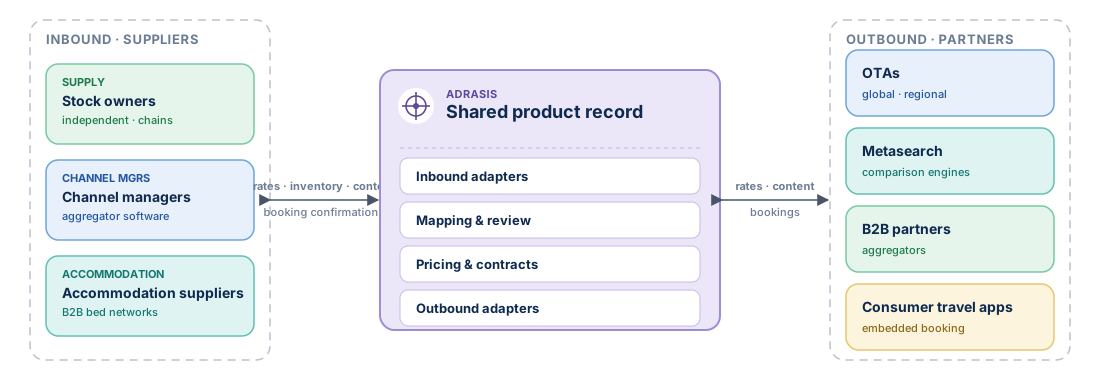
| Flow | Direction | What you publish or receive | Connected parties |
|---|---|---|---|
| Inbound | Supplier → Adrasis | Property catalog, rates, inventory, restrictions, bookings | Hotels, channel managers, supply-side accommodation wholesalers |
| Outbound | Adrasis → Partner | Availability, rates and inventory updates, booking acknowledgements, content updates, visible rate plans | OTAs, metasearch engines, B2B partners, consumer travel apps |
Why keep the flows together
Splitting supply intake and outbound distribution into separate tools creates drift. Adrasis keeps the operating context together for three practical reasons.
Rates stay traceable
single fact · no drift
EUR 120/night, refundable, breakfast included keeps the same commercial source whether an operator typed it in or it came from a supplier. Duplicating channel-specific copies creates drift.
Mapping reconciles in one place
one room match
A room called Deluxe Sea View by one supplier and DSV Standard by a partner must resolve to the same room once, not separately in each direction. See Mapping & review.
Contracts drive downstream pricing
one rule per markup
A markup applied to a supplier rate before publishing it to a partner is one distribution rule, not two parallel calculations that your team has to keep in sync.
Adrasis converts the product information into the data format required by each connected system.
Where to manage connections
Open Connectivity to manage the systems that supply your organization and the channels where you sell. For example, use Supply sources to review an accommodation supplier, then Sales channels to open an API partner account.
| Page | What you do |
|---|---|
| Overview | Review connection status and items needing attention. |
| Supply sources | Open Suppliers, Supplier hotels or Channel managers. Review supplier terms, choose which supplier hotels to sell, and follow incoming hotel connections. |
| Sales channels | Open Channels for sales connections or API partners for partner accounts and their connections. |
| Connection requests | Follow requests and the approvals needed to establish a connection. |
| Credentials | Manage the access details used by your organization's connections. |
The property's Connectivity tab keeps its own channel connections and mappings. Sub-agency selling rights remain under Distribution, in Sales Network. The pages you can see depend on your permissions.
Where to next
- How channels are configured end to end → Channels
- What Adrasis publishes outward → Outbound overview
- What flows in from suppliers → Inbound overview